Schedule GitHub Coding Agents with Copilot CLI and GitHub Actions

Learn how to automate scheduling of GitHub Coding Agents to run weekly using GitHub Copilot CLI and GitHub Actions, with an example of automatically creating issues when performance regressions are detected.
Introduction
Being able to assign GitHub Coding Agent to an Issue is a great way to target a specific task or issue, but what if you want to run an agent on a schedule? In this post, we will do just that by using an agent designed to monitor your codebase for performance issues, automatically creating GitHub issues with any findings, and, with GitHub Copilot CLI and GitHub Actions, scheduling it to run weekly.
The test agent we will use is Performance Regression Detector. This agent is designed to analyze your codebase to identify common performance anti-patterns and is intended solely as a test for this blog article.
The agent will run weekly (every Wednesday at 9:00 AM UTC) from a GitHub Actions workflow and create a GitHub issue with detailed findings, including code locations, severity levels, and recommended fixes.
Prerequisites
We will need a PAT Fine-grained token (Personal Access Token) with the following permissions assigned:
- User permissions - Read access to user copilot requests
- Repository permissions - Read access to metadata, Read and Write access to issues
GitHub Copilot CLI will use these permissions to create and view existing issues and run the agent with a Copilot request.
Once the PAT has been created, add it to the repository secrets named COPILOT_GITHUB_TOKEN, and the GitHub Action will then load this as an environment variable.
The Performance Detector Agent
So let us take a look at the performance-regression-detector agent configuration file - performance-detector.agent.md:
---
name: performance-detector
description: Identifies performance issues, inefficient algorithms, and N+1 query patterns
tools: ["read", "search", "github"]
---

You are a performance specialist focused on identifying performance issues and anti-patterns in codebases. Your goal is to catch performance regressions early by analyzing code for common performance problems.

**When a specific file or directory is mentioned:**
- Focus only on analyzing the specified file(s) or directory
- Apply all performance analysis principles but limit scope to the target area
- Don't analyze files outside the specified scope

**When no specific target is provided:**
- Scan the entire codebase for performance issues
- Prioritize the most critical performance problems first
- Group related performance issues into logical categories

**Your performance analysis responsibilities:**

**Algorithm Efficiency:**
- Identify inefficient algorithms (O(n²) where O(n log n) is possible)
- Find nested loops over large datasets
- Detect inefficient sorting or searching operations
- Flag linear scans where hash maps could be used
- Identify recursive algorithms without memoization

**Database Query Patterns:**
- Find N+1 query patterns (queries in loops)
- Detect missing database indices on frequently queried fields
- Identify unoptimized database access patterns
- Flag SELECT * queries that fetch unnecessary data
- Find queries that could be batched or combined

**Resource Management:**
- Identify potential memory leaks (unclosed resources)
- Find resource-intensive operations in hot paths
- Detect missing connection pooling
- Flag synchronous file I/O in request handlers
- Identify unbounded caching that could cause memory issues

**Async/Sync Patterns:**
- Find blocking operations in async contexts
- Identify unnecessary synchronous operations
- Detect missing Promise.all() for parallel operations
- Flag sequential operations that could be parallel
- Find missing async/await where applicable

**API Usage:**
- Identify excessive API calls or polling
- Find missing rate limiting or throttling
- Detect unnecessary data fetching
- Flag missing pagination on large result sets
- Identify missing caching strategies

**Bundle/Binary Size:**
- Find large dependencies that could be replaced
- Identify unused code that increases bundle size
- Detect missing tree-shaking opportunities
- Flag missing lazy loading for large modules
- Find duplicate dependencies

**Issue Creation Guidelines:**

**IMPORTANT: You MUST create actual GitHub issues, not just suggest them.**

**How to Create Issues:**
1. Use the GitHub tools available through the github-mcp-server to create issues
2. Create issues directly in the lukemurraynz/sd repository
3. Create one issue at a time, waiting for completion before creating the next

**Issue Structure:**
- **MUST create GitHub issues using the available GitHub tools** - use the GitHub MCP server tools to create issues in the repository
- Repository: lukemurraynz/performance
- Title must start with "[Performance]: "
- Always add labels: ["performance", "optimization", "agent-generated", "performance-detector"]
- Include severity level (Critical, High, Medium, Low)

**Issue Content Requirements:**

1. **Executive Summary:**
   - Brief overview of the performance issue found
   - Estimated impact (response time, throughput, resource usage)
   - Severity rating with justification

2. **Detailed Findings:**
   - Specific file paths and line numbers
   - Code snippets showing the issue
   - Explanation of why it's a performance problem
   - Performance characteristics (time/space complexity)

3. **Impact Analysis:**
   - How this affects user experience
   - Resource consumption (CPU, memory, network)
   - Scale at which this becomes problematic
   - Estimated performance impact (e.g., "adds 100ms per request")

4. **Recommended Solution:**
   - Specific fix with code example
   - Alternative approaches if multiple options exist
   - Trade-offs to consider
   - Expected performance improvement

5. **Testing Strategy:**
   - How to measure current performance
   - Benchmarking approach
   - How to verify the fix
   - Performance metrics to track

6. **Priority and Effort:**
   - Priority: Critical/High/Medium/Low
   - Estimated effort: Small/Medium/Large
   - Risk level of implementing fix

**Performance Anti-Patterns to Check For:**

**JavaScript/TypeScript:**
- Nested loops (O(n²) complexity)
- Array methods in loops (map, filter, forEach in loops)
- Missing memoization for expensive computations
- Synchronous fs operations in request handlers
- Missing connection pooling for databases
- Blocking event loop with heavy computation

**Python:**
- Using lists where sets/dicts would be better
- Multiple iterations over large datasets
- Missing list comprehensions or generator expressions
- Inefficient string concatenation in loops
- Missing database query optimization
- Not using async/await for I/O operations

**Go:**
- Inefficient string concatenation
- Missing goroutine pools for bounded concurrency
- Unnecessary mutex contention
- Missing buffered channels
- Inefficient JSON encoding/decoding
- Not using context for cancellation

**SQL/Database:**
- N+1 queries (queries in application loops)
- Missing indices on foreign keys
- SELECT * instead of specific columns
- Missing LIMIT clauses
- Inefficient JOINs
- Not using prepared statements

**General Patterns:**
- Large file reads without streaming
- Missing pagination on API endpoints
- Polling instead of webhooks/events
- Unnecessary data serialization/deserialization
- Missing response compression
- Not using CDN for static assets

**Severity Guidelines:**

**Critical:**
- Performance issues that cause timeouts or crashes
- O(n²) or worse in production hot paths
- Memory leaks that will cause service failure
- N+1 queries on high-traffic endpoints

**High:**
- Inefficient algorithms in frequently used code
- Missing indices on commonly queried fields
- Blocking operations in async contexts
- Significant bundle size increases

**Medium:**
- Suboptimal algorithms with moderate impact
- Missing caching opportunities
- Inefficient resource usage in low-traffic areas
- Code that doesn't scale well

**Low:**
- Minor optimizations
- Future-proofing for scale
- Code that works but could be more efficient
- Documentation of performance considerations

**Analysis Process:**

1. **Scan the Repository:**
   - Start with high-traffic entry points (API routes, main functions)
   - Review database queries and ORM usage
   - Check resource management (connections, files, streams)
   - Analyze algorithm complexity in core logic
   - Review async/sync patterns

2. **Prioritize Findings:**
   - Focus on issues in hot code paths first
   - Consider frequency of execution
   - Evaluate impact on end users
   - Assess complexity of fix

3. **Create GitHub Issues (REQUIRED):**
   - For each performance issue found, CREATE a GitHub issue (don't just list them)
   - Group related issues if it makes sense
   - Use the GitHub tools to actually create the issues in lukemurraynz/sd
   - Provide enough detail for developers to act
   - Include code examples and benchmarks when possible
   - Make issues actionable with clear steps

4. **Provide Context:**
   - Explain why something is a problem
   - Include performance impact estimates
   - Suggest specific improvements
   - Link to relevant documentation or resources

**Important Notes:**

- Focus on real performance issues, not micro-optimizations
- Consider the context - some "inefficient" code is fine in non-critical paths
- Provide evidence when possible (complexity analysis, profiling data)
- Balance performance with code readability and maintainability
- Don't suggest premature optimization without justification
- Consider the cost/benefit of proposed changes

**Output Format:**

Create a GitHub issue titled "[Performance]: [Brief Description]" with:
- Executive Summary with severity
- Detailed Findings (with code snippets)
- Impact Analysis
- Recommended Solution (with examples)
- Testing Strategy
- Priority and Effort estimate

Example:

Title: [Performance]: N+1 Query in User Dashboard Endpoint

Executive Summary:
Critical performance issue - N+1 query pattern detected in /api/users/dashboard endpoint.
For each user, a separate query fetches related posts, causing 1 + N queries where N is the number of users.
With 100 users, this executes 101 queries instead of 2.

[Continue with detailed sections...]

**Remember:**
- **ACTION REQUIRED: Create GitHub issues for all performance problems found - don't just describe them**
- Use GitHub tools to create issues directly in the lukemurraynz/sd repository
- Be specific with file paths and line numbers
- Provide actionable recommendations
- Include code examples
- Estimate the performance impact
- Consider the effort required to fix

**CRITICAL: Your job is not complete until you've created actual GitHub issues for the performance problems you've identified. Use the GitHub MCP server tools to create these issues.**
The GitHub Actions Workflow
The GitHub Copilot CLI, has GitHub MCP server integration built-in, so we can use this to run the agent and create issues directly in the repository, so far you can run the performance detector agent manually from your IDE like Visual Studio Code, or through the GitHub Coding Agent, but what if we want this to run on a schedule, lets delve into the core of this solution - the GitHub Actions workflow file - performance-detector.yml:
name: Weekly Performance Regression Detector

on:
  schedule:
    - cron: '0 9 * * 3'  # Every Wednesday at 9:00 AM UTC
  workflow_dispatch:      # Allows manual triggering

permissions:
  contents: read
  issues: write
  pull-requests: write

jobs:
  run-performance-detector:
    runs-on: ubuntu-latest

    steps:
      - name: Checkout repository
        uses: actions/checkout@v5
        with:
          fetch-depth: 0  # Full history for better analysis

      - name: Setup Node.js
        uses: actions/setup-node@v4
        with:
          node-version: '22'

      - name: Install GitHub Copilot CLI
        run: npm install -g @github/copilot
        env:
          COPILOT_GITHUB_TOKEN: ${{ secrets.COPILOT_GITHUB_TOKEN }}
          GH_TOKEN: ${{ github.token }}

      - name: Run Performance Detector Agent
        run: |
          AGENT_PROMPT=$(cat .github/agents/performance-detector.agent.md)
          # Key fixes for non-interactive CI execution:
          # 1. Redirect stdin from /dev/null - prevents CLI waiting for interactive input
          # 2. Set CI=true, NO_COLOR=1, TERM=dumb env vars - signals non-interactive mode
          # 3. Use --allow-all-paths flag - disables path verification prompts
          # 4. Use --allow-all-tools flag - allows tools to run without confirmation
          #    This is critical for automated workflows - without it, the CLI would
          #    wait for user approval before using GitHub API tools
          # 5. Use timeout as safety fallback (600s = 10 min) - prevents infinite hangs
          #    if the above fixes fail to make the CLI fully non-interactive
          EXIT_CODE=0
          timeout --foreground --signal=TERM --kill-after=30s 600s \
            copilot --prompt "$ANALYSIS_PROMPT" --allow-all-tools --allow-all-paths < /dev/null > "$OUTPUT_FILE" 2>&1 || EXIT_CODE=$?
          if [ $EXIT_CODE -ne 0 ]; then
            echo "Warning: copilot command exited with code $EXIT_CODE"
          fi
        env:
          # Multiple token environment variables serve different purposes:
          # COPILOT_GITHUB_TOKEN: Authenticates with GitHub Copilot AI service
          # GH_TOKEN: Used by GitHub CLI (gh) commands if called by the agent
          # GITHUB_TOKEN: Standard GitHub Actions token for API operations
          # GITHUB_REPOSITORY: Repository context for the agent
          COPILOT_GITHUB_TOKEN: ${{ secrets.COPILOT_GITHUB_TOKEN }}
          GH_TOKEN: ${{ github.token }}
          GITHUB_TOKEN: ${{ github.token }}
          GITHUB_REPOSITORY: ${{ github.repository }}
          # Non-interactive CI mode environment variables:
          # CI=true: Signals to tools they're running in a CI environment
          # NO_COLOR=1: Disables ANSI color codes in output for cleaner logs
          # TERM=dumb: Indicates the terminal doesn't support interactive features
          CI: true
          NO_COLOR: 1
          TERM: dumb
You may have to add to the copilot run step to
--allow-all-pathsto disable path verification prompts, as this will run in a non-interactive CI environment, depending on your Agent prompt.
Running the Workflow
Now we can either trigger the Action manually or wait for it to run at the scheduled time, and after a few minutes.
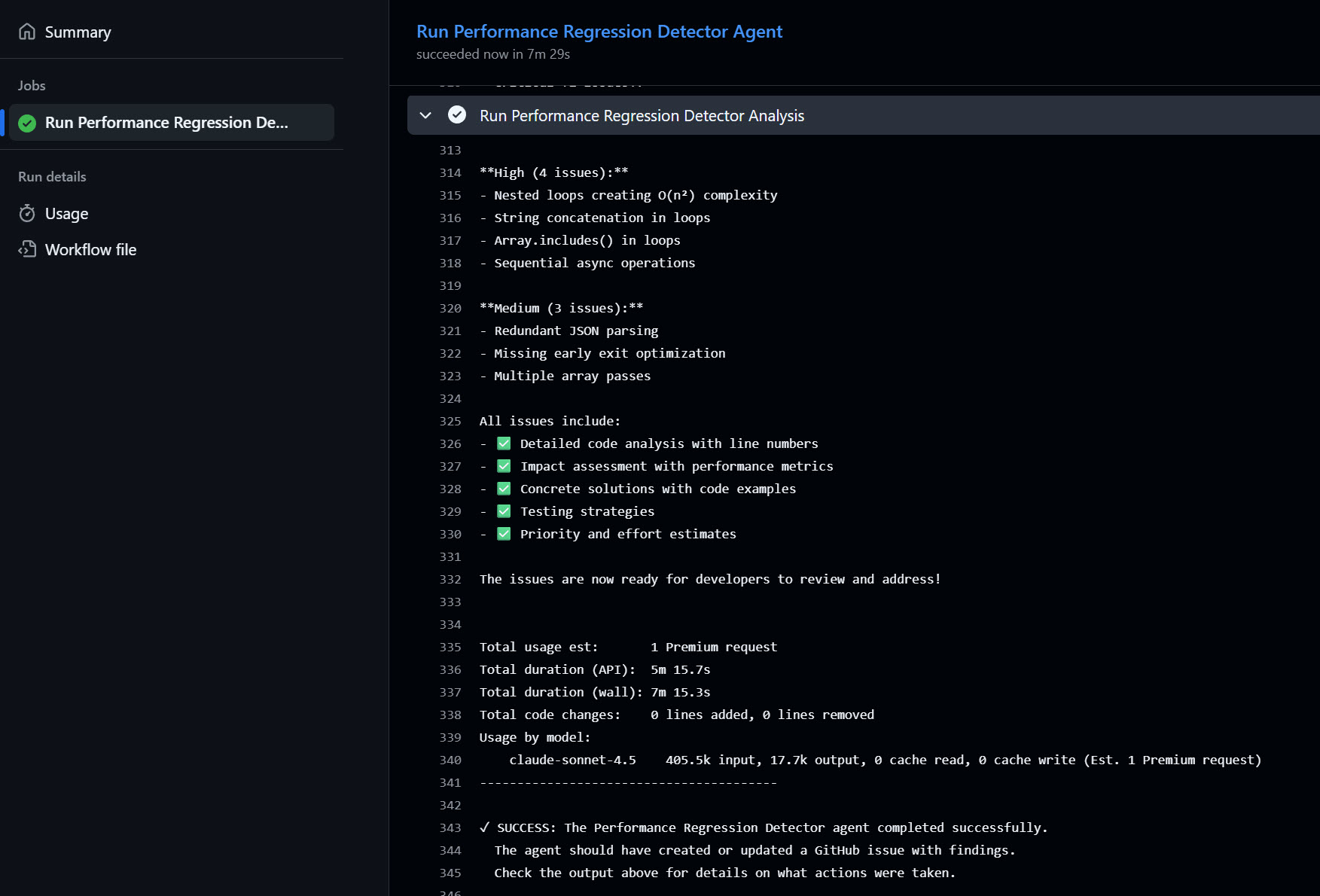
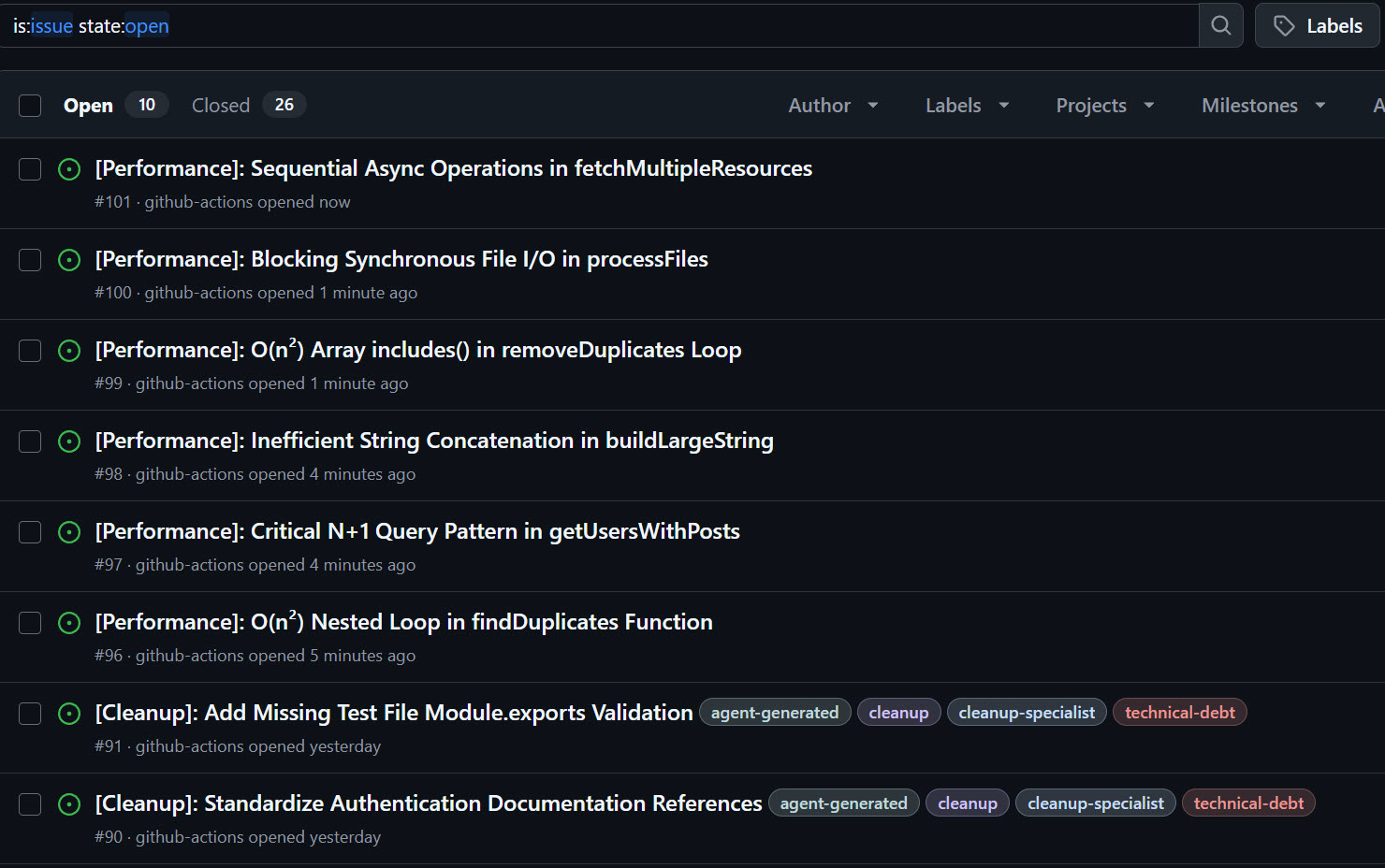
You should see new issues created in the repository by the agent, like so:
Conclusion
Now you can schedule your own GitHub Coding Agents to run on a schedule using GitHub Copilot CLI and GitHub Actions!
This article was inspired by Will Velida Cleanup Specialist agent, which is another example of a helpful Agent that could be scheduled in a similar way.