Container Security Hardening for Azure Container Apps

Every time I see a production container running as root, I wince.
It is one of those things that is easy to fix but gets overlooked because the app "works fine" without it. But container security is not just about non-root users. It is about the full stack: image build, runtime configuration, network policy, input validation, and rate limiting.
In this post, I will walk through a checklist I used to harden a .NET project running on Azure Container Apps.
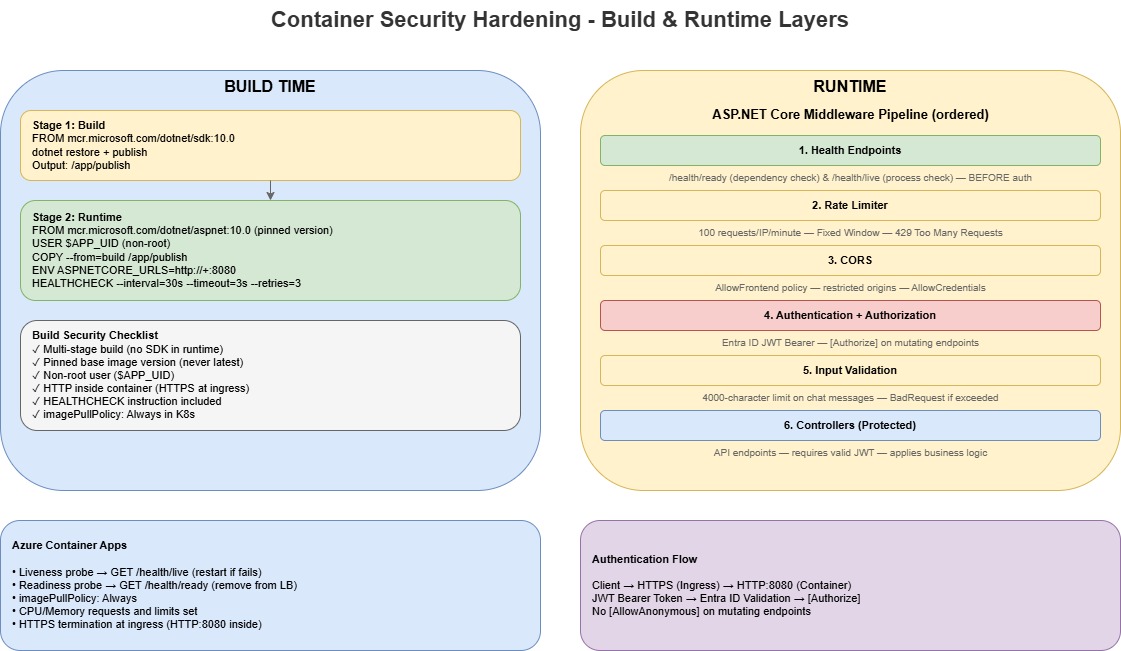
1. Non-root containers
Running as root inside a container means that if an attacker exploits a vulnerability in your application, they inherit root privileges within the container. In some scenarios, that can be leveraged for container escape.
The fix is straightforward. In your Dockerfile:
FROM mcr.microsoft.com/dotnet/aspnet:10.0 AS runtime
WORKDIR /app

COPY --from=build /app/publish .

ENV ASPNETCORE_HTTP_PORTS=8080
EXPOSE 8080

# Switch to non-root user
USER $APP_UID

HEALTHCHECK --interval=30s --timeout=3s --start-period=10s --retries=3 \
    CMD curl -f http://localhost:8080/health/ready || exit 1

ENTRYPOINT ["dotnet", "App.ControlPlane.Api.dll"]
Key points:
- For official Microsoft .NET Linux images (.NET 8+), you do not need to create your own user. The images already include a non-root
appuser. - Use
USER apporUSER $APP_UID($APP_UIDis UID1654). I preferUSER $APP_UIDbecause it also works cleanly with KubernetesrunAsNonRootchecks. - The image is non-root capable, but it is not automatically non-root unless you set
USERexplicitly. - Place
USERafterCOPYso the app files are copied first and then executed as non-root. - Use port
8080(not 80/443). Non-privileged ports avoid root requirements, and moving back to port80means you cannot run as non-root.
If you are using a base image that does not provide a non-root user (or you have custom filesystem write paths), create/chown a dedicated runtime user for those paths before switching away from root.
2. Multi-stage builds
Multi-stage Docker builds keep build tools (SDK, compilers, npm dev dependencies) out of the runtime image. This reduces the attack surface and image size.
# Build stage — SDK and build toolchain
FROM mcr.microsoft.com/dotnet/sdk:10.0 AS build
WORKDIR /src
COPY . .
RUN dotnet restore src/Api/App.ControlPlane.Api.csproj
RUN dotnet publish src/Api/App.ControlPlane.Api.csproj -c Release -o /app/publish /p:UseAppHost=false

# Runtime stage — minimal runtime only
FROM mcr.microsoft.com/dotnet/aspnet:10.0 AS runtime
For frontend workloads, the pattern is similar:
# Build stage with Node.js
FROM node:20-alpine AS build
# ... npm ci, vite build

# Runtime stage with production dependencies only
FROM node:20-alpine AS runtime
RUN npm ci --only=production
Use --only=production (or --omit=dev in npm 9+) in runtime stages so TypeScript, ESLint, Vite, and other dev tooling are not shipped to production.
3. Pin base image versions
Never use latest in production images.
❌ Bad — unpredictable
FROM mcr.microsoft.com/dotnet/aspnet:latest
✅ Good — deterministic and reproducible
FROM mcr.microsoft.com/dotnet/aspnet:10.0
Pinning to major.minor gives you a solid balance between stability and patch cadence. If you need strict reproducibility, pin to an image digest.
4. Health probes that bypass auth
Health endpoints should bypass authentication middleware. If readiness requires a JWT, the platform cannot accurately determine service health.
app.MapGet("/health/ready", () => Results.Ok(new
{
    Status = "Healthy",
    Timestamp = DateTime.UtcNow,
    Service = "app-control-plane-api",
    Version = "1.0.0"
}));

app.MapGet("/health/live", () => Results.Ok(new
{
    Status = "Alive",
    Timestamp = DateTime.UtcNow
}));
In practice, map these endpoints before strict authorization rules, or explicitly bypass auth for /health/*.
Configure both liveness and readiness. Liveness answers "is the process alive?" Readiness answers "Can it safely receive traffic?"
5. Rate limiting
The API uses ASP.NET Core rate limiting middleware with a fixed-window policy:
builder.Services.AddRateLimiter(options =>
{
    options.GlobalLimiter = PartitionedRateLimiter.Create<HttpContext, string>(httpContext =>
        RateLimitPartition.GetFixedWindowLimiter(
            partitionKey: httpContext.Connection.RemoteIpAddress?.ToString() ?? "anonymous",
            factory: _ => new FixedWindowRateLimiterOptions
            {
                PermitLimit = 100,
                Window = TimeSpan.FromMinutes(1),
                QueueProcessingOrder = QueueProcessingOrder.OldestFirst,
                QueueLimit = 0
            }));

    options.RejectionStatusCode = StatusCodes.Status429TooManyRequests;
});
This gives a clear policy: 100 requests per minute per IP, fail fast with 429, and no queuing.
In multi-replica environments (including Azure Container Apps), in-memory rate limiting is per instance. For true global limits across replicas, use a distributed store such as Azure Cache for Redis.
6. Input validation at the API boundary
Input validation should happen at the edge of the API, before expensive processing.
// Validate input length to prevent abuse
const int MaxMessageLength = 4000;
if (userMessage.Length > MaxMessageLength)
{
    // Return 400 Bad Request with specific error
}
This is a small change that helps with:
- Prompt injection attempts using oversized payloads
- Resource exhaustion from unbounded request bodies
- Token/cost control for downstream AI calls
7. Authentication with Entra ID JWT bearer
If you have a system, such as an API use Microsoft Entra ID bearer tokens for authentication:
builder.Services.AddAuthentication(JwtBearerDefaults.AuthenticationScheme)
    .AddMicrosoftIdentityWebApi(builder.Configuration.GetSection("AzureAd"));
Authorization policies then control operation-level access:
[Authorize(Policy = "AnalysisRead")]
public async Task AgentChat([FromBody] AgentChatRequest request, ...)
Mutating endpoints are authenticated. Health probes remain the only unauthenticated paths.
8. Restrictive CORS
Configure Cross-Origin Resource Sharing (CORS) for known frontend origins only:
builder.Services.AddCors(options =>
{
    options.AddPolicy("AllowFrontend", policy =>
    {
        policy.WithOrigins(allowedOrigins)
              .AllowAnyHeader()
              .AllowAnyMethod()
              .AllowCredentials();
    });
});
If allowed origins are sourced from config, remember most apps load this at startup. Update config and restart the deployment to apply changes.
9. HTTPS termination at ingress (not inside container)
For Azure Container Apps, TLS is terminated at ingress. Your container should listen on HTTP internally:
ENV ASPNETCORE_HTTP_PORTS=8080
EXPOSE 8080
If you force HTTPS in-container (https://+:443) without mounting certificates, startup failures are expected.
Practical hardening checklist
Use this in PR reviews:
| Check | Status |
|---|---|
| Non-root user in Dockerfile | ✅ |
| Multi-stage build (no SDK in runtime) | ✅ |
Pinned base image version (not latest) | ✅ |
| Health probes bypass auth | ✅ |
| Liveness and readiness probes configured | ✅ |
| Rate limiting enabled | ✅ |
| Input validation at API boundary | ✅ |
| Entra ID JWT authentication | ✅ |
| CORS restricted to known origins | ✅ |
| HTTP (not HTTPS) inside container | ✅ |
imagePullPolicy: Always in manifests | ✅ |
| No secrets in Dockerfile or image layers | ✅ |
HEALTHCHECK instruction in Dockerfile | ✅ |
Final thoughts
Container security is not a single switch.
It is a set of patterns that compound: non-root containers, deterministic builds, probe hygiene, rate limiting, input validation, and clear auth boundaries. Applied together, they significantly reduce risk for workloads running on Azure Container Apps.
And don't forget Azure Container Registry Continuous Patching and Containers Supply Chain Framework.
If you want to map this to broader platform guidance, review the Security pillar of the Azure Well-Architected Framework.