Change-Driven Architecture on Azure with Drasi

Today, we are going to look at change-driven architecture on Azure using Drasi, and why it matters from a Well-Architected perspective.
If you have ever built a system that polls a database every few seconds, asking, "Has anything changed?" - this one is for you.
I recently built an Emergency Alert System and Santa Digital Workshop and Automate Azure Bastion with Drasi Realtime RBAC Monitoring proof of concepts on Azure that use Drasi for reactive data processing. One of the most interesting things I discovered was that change-driven architecture fundamentally shifts how you think about reliability, cost, and operational efficiency.
This article explores architectural patterns from a proof of concept. The patterns are production-applicable, but the implementation itself is a learning exercise.
The Polling Problem
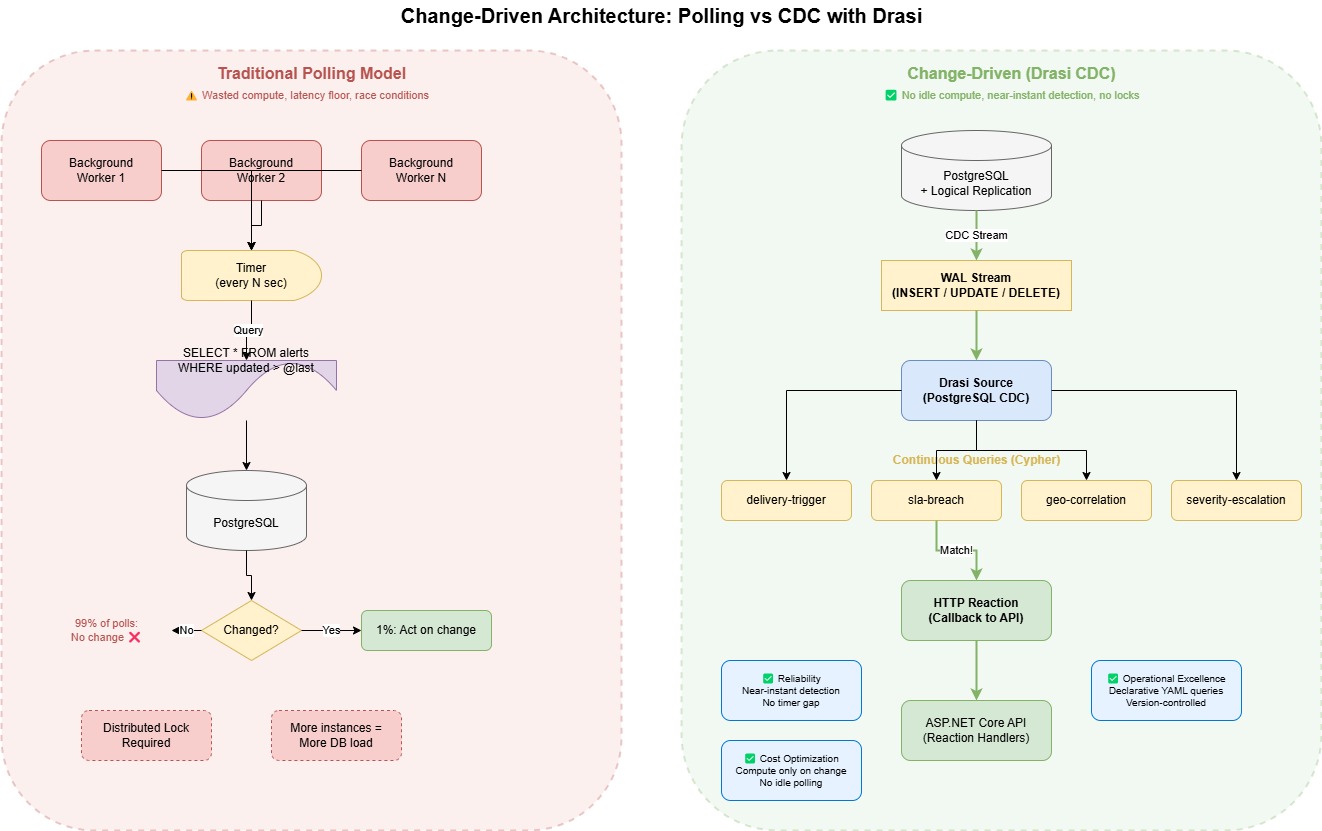
Most event-driven systems I have worked on follow the same pattern: a background service queries the database on a timer, checks for changes, and then acts on them.
It works, but it has some well-known problems:
- Wasted compute - 99% of polls return "nothing changed"
- Latency - you only detect changes at the poll interval (1 second, 5 seconds, 30 seconds?)
- Race conditions - if multiple instances poll simultaneously, you need distributed locks
- Scaling challenges - more instances means more database load, not faster detection
From a Well-Architected Cost Optimization perspective, polling is paying for compute that mostly does nothing.
From a Reliability perspective, poll intervals create a detection floor - you simply cannot react faster than your timer.
Enter Change Data Capture
Change Data Capture (CDC) flips this model. Instead of asking the database whether something has changed, the database tells you when it does.
PostgreSQL Flexible Server (just one of Drasi sources) supports logical replication natively, which streams every INSERT, UPDATE, and DELETE as it happens.
Drasi sits on top of this CDC stream and runs continuous queries - written in Cypher - that evaluate incoming changes against patterns you define. When a pattern matches, Drasi fires a reaction (in my case, an HTTP callback to an API).
The architecture follows a simple flow: Source → Queries → Reactions.
# Drasi CDC Source Configuration
apiVersion: v1
kind: Source
name: postgres-alerts
spec:
  kind: PostgreSQL
  properties:
    host: ${POSTGRES_HOST}
    port: ${POSTGRES_PORT}
    user: ${POSTGRES_USER}
    password: ${POSTGRES_PASSWORD}
    database: ${POSTGRES_DATABASE}
    ssl: true
    tables:
      - emergency_alerts.alerts
      - emergency_alerts.areas
      - emergency_alerts.recipients
      - emergency_alerts.delivery_attempts
      - emergency_alerts.approval_records
      - emergency_alerts.correlation_events
      - emergency_alerts.area_signals
      - emergency_alerts.weather_observations
      - emergency_alerts.road_maintenance
This source watches nine tables. Every change to any of these tables flows into the continuous query engine.
Which Drasi Mode Should You Use?
One useful design decision early on is picking the right Drasi runtime for your workload. Drasi is available in three forms with the same core model (Sources → Continuous Queries → Reactions), but different operational trade-offs.
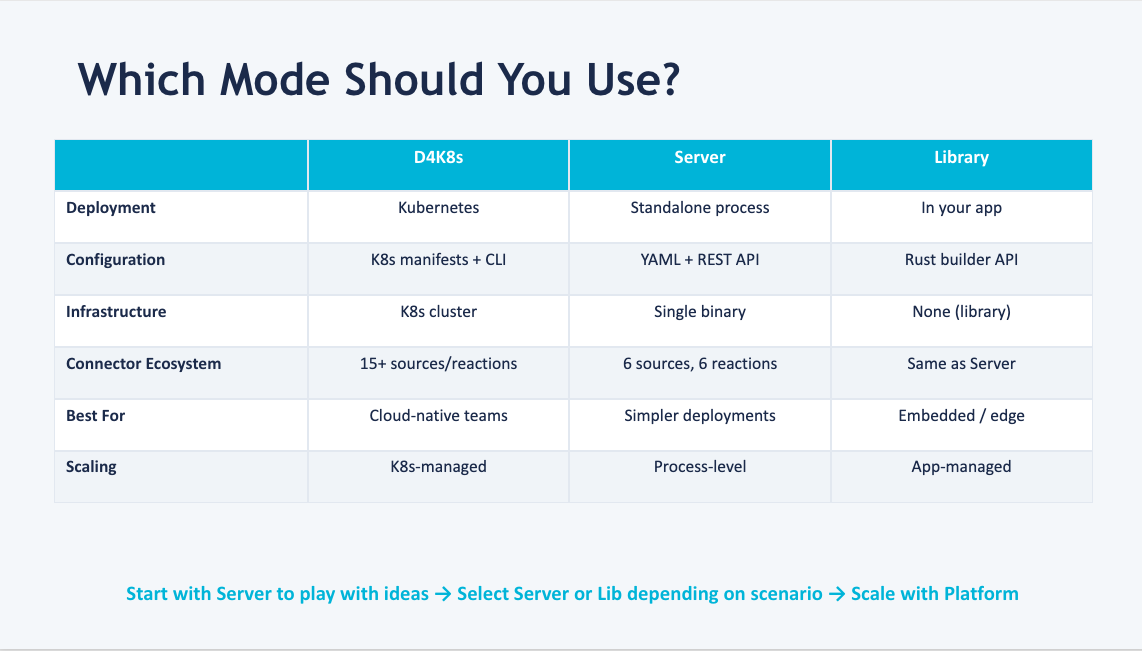
- Drasi for Kubernetes (D4K8s) - best for production-scale, cloud-native platforms where you want Kubernetes-native scaling, observability, and operational controls.
- Drasi Server - best for local development, Docker Compose, edge, and non-Kubernetes environments where you still want full Drasi capabilities in a single process/container.
- drasi-lib - best when building a Rust app and you want in-process change detection with no separate Drasi infrastructure.
A practical path I have found useful: start with Server to iterate quickly, move to D4K8s as reliability/scale requirements grow, and choose drasi-lib when your change logic should live directly inside a Rust service.
Continuous Queries - The Logic Layer
Here is where it gets interesting.
A continuous query is not a one-off SQL statement. It is a standing query that continuously evaluates against the stream of changes (it could be one or across multiple sources).
For example, the delivery trigger query fires when an alert transitions to Approved with a Pending delivery status:
apiVersion: v1
kind: ContinuousQuery
name: delivery-trigger
spec:
  mode: query
  sources:
    subscriptions:
      - id: postgres-alerts
        nodes:
          - sourceLabel: alerts
  query: |
    MATCH (a:alerts)
    WHERE a.status = 'Approved' AND a.delivery_status = 'Pending'
    RETURN
      a.alert_id AS alertId,
      a.headline AS headline,
      a.severity AS severity,
      a.sent_at AS approvedAt,
      drasi.changeDateTime(a) AS triggeredAt
No polling. No timers.
The moment a row changes in the alerts table and matches these conditions, Drasi fires the reaction.
The Well-Architected Impact
Reliability
Change-driven architecture eliminates the detection gap.
In a polling model, if your timer runs every 5 seconds, a critical SLA breach might sit undetected for up to 5 seconds. With CDC, detection is near-instantaneous.
In my proof of concept, I run 15+ continuous queries simultaneously - including SLA-breach detection every 60 seconds, approval-timeout detection every 5 minutes, cross-region correlation, and severity-escalation tracking.
Each query runs independently, and if one fails, the others continue operating. This aligns with the Well-Architected failure mode analysis guidance - decompose your detection logic so a failure in one area does not cascade.
Cost Optimization
No idle compute cycles polling an unchanged database.
The compute only activates when data actually changes. For workloads with bursty change patterns (like an emergency alert system), this can significantly reduce steady-state cost compared to a fleet of polling workers.
Operational Excellence
Each continuous query is a declarative YAML file, version-controlled alongside the infrastructure.
Adding a new detection pattern means writing a new query file and deploying it - no code changes to the application, no new background services, no additional infrastructure.
infrastructure/drasi/queries/
├── sla-monitoring/
│   ├── delivery-sla-breach.yaml
│   ├── approval-timeout.yaml
│   └── expiry-warning.yaml
├── risk-detection/
│   ├── geographic-correlation.yaml
│   ├── regional-hotspot.yaml
│   ├── severity-escalation.yaml
│   └── duplicate-suppression.yaml
└── recommendations/
    ├── delivery-trigger.yaml
    ├── all-clear-suggestion.yaml
    └── area-expansion-suggestion.yaml
When to Use This Pattern
Change-driven architecture is a good fit when:
- Low-latency detection matters - SLA monitoring, fraud detection, security alerts
- Multiple detection rules run in parallel - you need 10+ independent queries watching the same data
- The write-to-read ratio is low - changes happen infrequently relative to how often you would poll
- You already use PostgreSQL or another source containing CDC - CDC comes free with logical replication
It is less suited for:
- High-frequency OLTP - if every row changes every second, you are essentially processing the full table continuously
- Simple CRUD - if you just need "notify me when a row is inserted," a database trigger or Event Grid integration might be simpler
- Teams unfamiliar with Cypher - the learning curve for graph-style queries is real
Getting Started
If you want to try this pattern, you need:
- Azure Kubernetes Service (AKS) - Drasi currently runs on Kubernetes (or a local KIND cluster you can run in a devcontainer for testing)
- PostgreSQL Flexible Server with logical replication enabled
- The Drasi CLI installed in your cluster
The Drasi documentation covers installation well. The key Azure-specific step is to enable logical replication on your PostgreSQL Flexible Server - set wal_level = logical and configure max_replication_slots to match the number of sources you plan to run.
If you are using Bicep to deploy PostgreSQL Flexible Server, set azure.extensions = postgis as a server parameter if you need spatial queries. The CDC source does not require PostGIS, but if your queries reference spatial data, the extension must be installed before running migrations.
Wrapping Up
Change-driven architecture addresses several Well-Architected concerns simultaneously:
- It reduces wasted compute (Cost Optimization)
- It eliminates detection gaps (Reliability)
- It keeps detection logic declarative and version-controlled (Operational Excellence)
Drasi makes this pattern accessible on Azure without writing custom CDC consumers or managing Kafka/Debezium infrastructure yourself.
The shift from "ask the database" to "let the database tell you" is subtle, but the architectural implications are significant.
You can find the full proof of concept on GitHub: lukemurraynz/EmergencyAlertSystem.