Running LiteLLM on AKS with azd and Bicep
I've been spending time with LiteLLM and wanted to see how far I could take it as a self-hosted LLM gateway on Azure Kubernetes Service. The goal was simple: build a deployment that you can spin up with a single azd up command, with all the production pieces: private networking, Redis caching, PostgreSQL for spend tracking, and a proper ingress with automatic TLS.
Turns out it works pretty well. Here's what I built and what I found.
What LiteLLM does
LiteLLM is an open-source proxy that sits between your applications and the LLM providers they call. You hit a single OpenAI-compatible endpoint, and LiteLLM routes to whatever backend you've configured - Azure OpenAI, Anthropic, OpenAI, or any of the 100+ providers it supports.
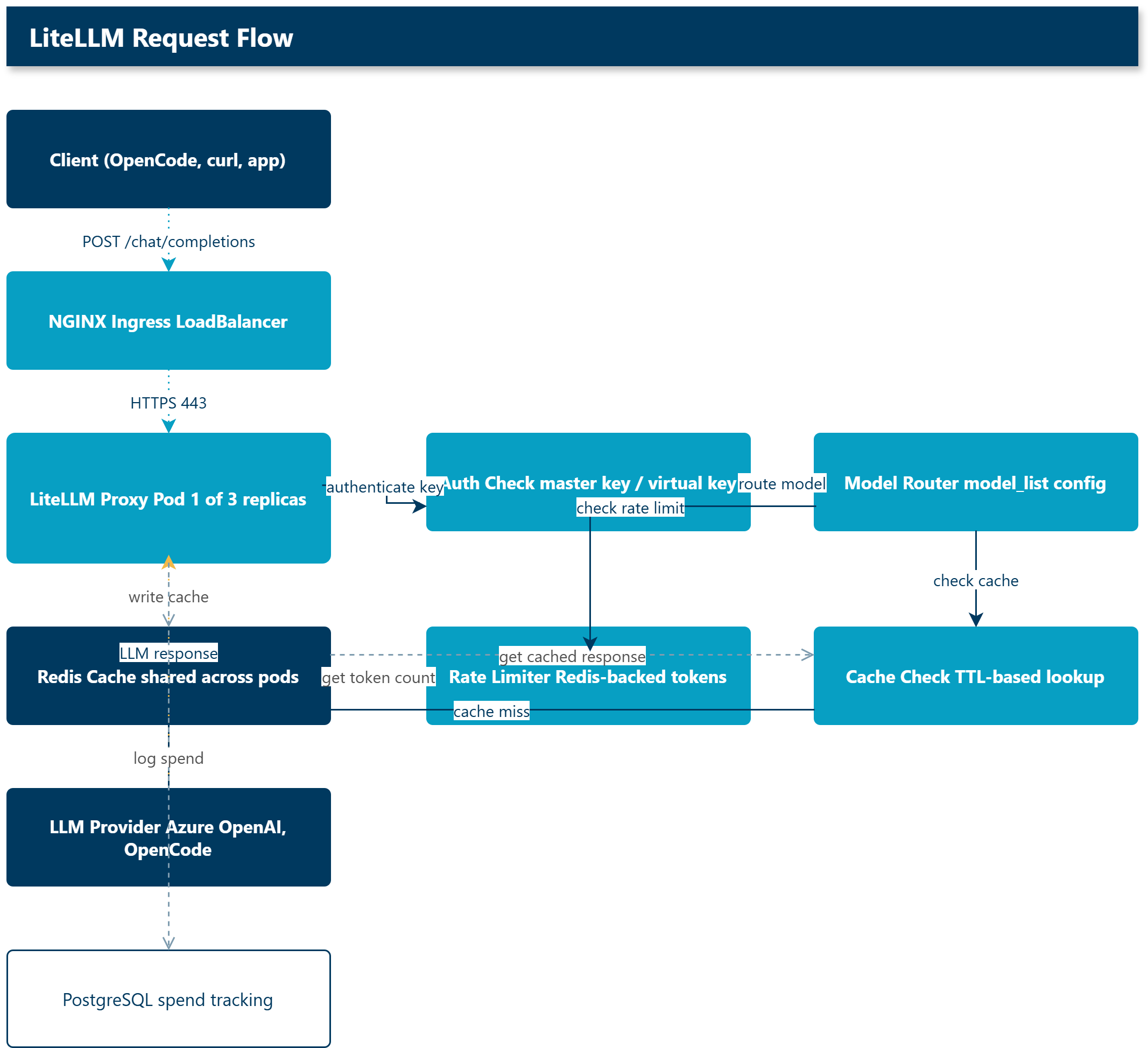
The useful bit for me was having a single place to manage authentication, rate limiting, caching, and spend tracking across all the models our team uses. Rather than distributing API keys for every provider, the team gets a virtual key from LiteLLM and I control which models they can access and what their budget is.
The deployment
I wanted to deploy this on AKS with everything managed through Infrastructure as Code. I used the Azure Developer CLI (azd) with Bicep for the infrastructure, with deployment lifecycle handled by PowerShell hooks.
The full source is at lukemurraynz/LiteLLM.AKSGateway if you want to skip the walkthrough and just deploy it.
Infrastructure
The Bicep template provisions a greenfield environment in a single resource group:
| Resource | Purpose |
|---|---|
| AKS cluster | Standard tier, system + user node pools, Azure CNI Overlay |
| Azure Container Registry | Stores the LiteLLM Docker image |
| PostgreSQL Flexible Server | Spend tracking, virtual key storage, user management |
| Azure Managed Redis | Distributed caching and rate limiting across replicas |
| Key Vault | Managed by the proxy for credential storage |
| Azure OpenAI | GPT-4o model deployment |
| VNet with 3 subnets | AKS nodes, private endpoints, and a dedicated ingress subnet |
| NAT Gateway | Outbound connectivity for the AKS cluster |
| Private DNS zones | Private endpoint resolution for all PaaS services |
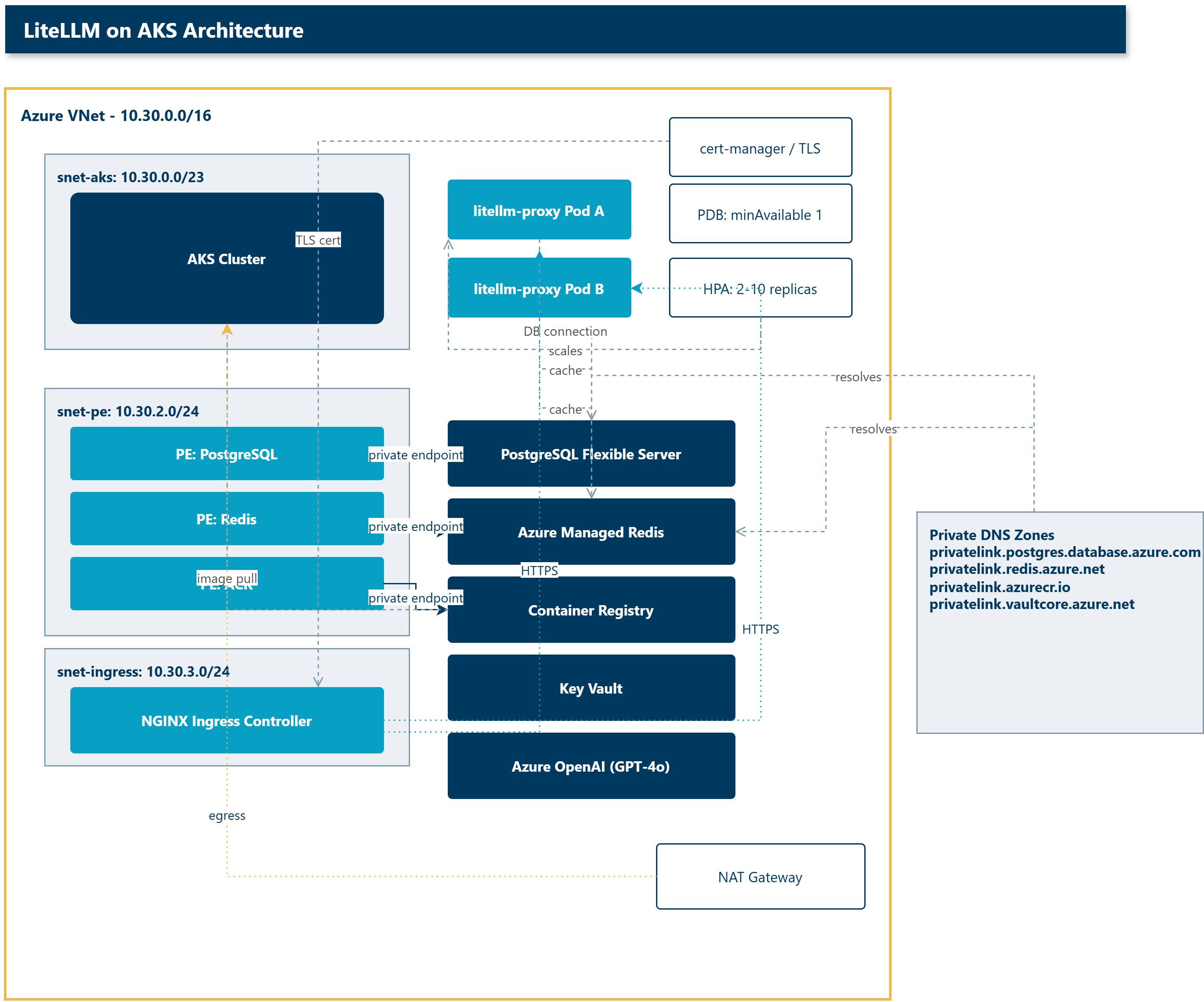
Every data service (PostgreSQL, Redis, ACR, Key Vault) is configured with private endpoints. No public IPs on the data plane. The AKS cluster uses Azure CNI Overlay with Azure Network Policy for pod-level segmentation.
Network design
The VNet is split into three subnets. The CIDR blocks are defined in infra/core/networking.bicep:
| Subnet | CIDR | Purpose |
|---|---|---|
snet-aks | 10.30.0.0/23 | AKS node pool (system + user) |
snet-pe | 10.30.2.0/24 | Private endpoints for PostgreSQL, Redis, ACR, Key Vault |
snet-ingress | 10.30.3.0/24 | Reserved for the NGINX ingress controller |
Outbound connectivity uses a NAT Gateway attached to the AKS subnet via a dedicated public IP (for example, pip-nat-vnet-<suffix>). The AKS cluster uses userAssignedNATGateway as its outbound type, which avoids the SNAT port exhaustion that can happen with loadBalancer outbound type at scale.
Private endpoint DNS resolution uses four Azure Private DNS zones, each linked to the VNet:
privatelink.postgres.database.azure.com
privatelink.redis.azure.net
privatelink.azurecr.io
privatelink.vaultcore.azure.net
These zones are created in the Bicep template and linked automatically. Pods resolve private endpoint IPs through the CoreDNS split-DNS patch (more on that later).
The public ingress path is separate: the NGINX ingress controller gets a public LoadBalancer IP, and cert-manager handles the Let's Encrypt TLS certificate through the HTTP-01 challenge. The DNS A record is managed through the sync-public-dns.ps1 hook, or created manually if you prefer.
The azd lifecycle
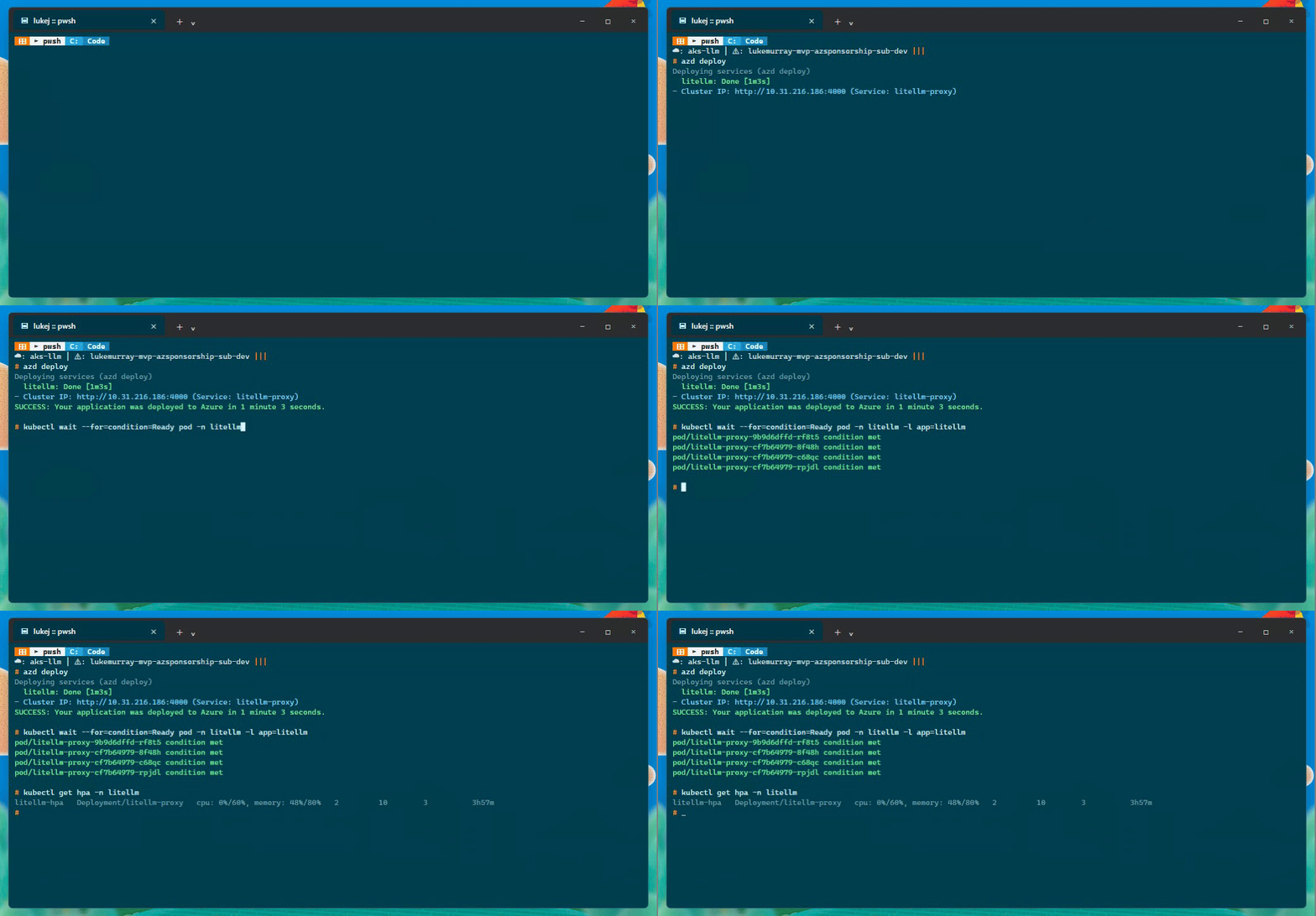
azd up runs through several stages, each with a PowerShell hook:
-
Preprovision - generates random secrets for the PostgreSQL admin password, LiteLLM master key, and salt key. Also installs
kustomizevia Winget if it is not present. -
Provision - deploys the Bicep template to Azure. This takes about 10-15 minutes and creates the full environment.
-
Postprovision - gets the AKS credentials, patches CoreDNS with a split-DNS configuration (Google DNS for public resolution, Azure DNS for private endpoint resolution), deploys the Kubernetes manifests via kustomize, and sets up the ingress controller.
-
Postdeploy - refreshes the Kubernetes secret with the latest connection strings and keys, restarts the deployment, and syncs the public DNS A record.
One thing I hit early on - the Bicep output aksClusterName was captured by azd as an environment variable, but azure.yaml was referencing ${AZURE_AKS_CLUSTER_NAME} which did not exist. A quick fix to ${aksClusterName} and the deployment ran clean.
The LiteLLM config
The proxy is configured through a ConfigMap that kustomize applies to the cluster. The config file defines the models, authentication, caching, and routing.
model_list:
  - model_name: azure-gpt-4o
    litellm_params:
      model: azure/gpt-4o
      api_base: os.environ/AZURE_OPENAI_ENDPOINT
      api_key: os.environ/AZURE_OPENAI_KEY
      api_version: "2024-10-21"

general_settings:
  master_key: os.environ/LITELLM_MASTER_KEY
  database_url: os.environ/DATABASE_URL
  database_connection_pool_limit: 10
  proxy_batch_write_at: 60
  allow_requests_on_db_unavailable: true

litellm_settings:
  cache: true
  cache_params:
    type: redis
    host: os.environ/REDIS_HOST
    port: os.environ/REDIS_PORT
    password: os.environ/REDIS_PASSWORD
    ssl: true
Adding OpenCode Zen and Go models
Once the Azure OpenAI model was working, I also wanted to see whether LiteLLM could front the OpenCode models I use day to day. The answer is yes. OpenCode Zen exposes an OpenAI-compatible endpoint at https://opencode.ai/zen/v1, and OpenCode Go exposes one at https://opencode.ai/zen/go/v1 for the OpenAI-compatible Go models.
That let me put Azure OpenAI, OpenCode Zen, and OpenCode Go behind the same LiteLLM endpoint:
| Model group | Example models | Upstream base URL |
|---|---|---|
| Azure OpenAI | azure-gpt-4o | os.environ/AZURE_OPENAI_ENDPOINT |
| OpenCode Zen | big-pickle, deepseek-v4-flash-free, mimo-v2.5-free | https://opencode.ai/zen/v1 |
| OpenCode Go (OpenAI-compatible) | glm-5.1, kimi-k2.6, deepseek-v4-pro | https://opencode.ai/zen/go/v1 |
| OpenCode Go (Anthropic-compatible) | minimax-m2.5, qwen3.7-plus | https://opencode.ai/zen/go |
The last row is the small gotcha. For the Anthropic-compatible Go models, LiteLLM's Anthropic provider appends /v1/messages automatically. If you set the base URL to https://opencode.ai/zen/go/v1, LiteLLM sends the request to /v1/v1/messages, and OpenCode quite correctly returns a 404. Setting the base URL to https://opencode.ai/zen/go fixes it.
The single proxy now exposes 19 models. A few of the Go subscription models currently return a GoUsageLimitError because my Go monthly limit is exhausted, but that still proved the routing path was correct. The free Zen models, including big-pickle, are available through the same proxy key.
The UI is useful once the proxy is running. I recorded this walkthrough after logging in (the login step is deliberately not captured so the master key never appears in the recording). It shows the live dashboard moving through the current configuration: Models + Endpoints, MCP Servers, and Virtual Keys.

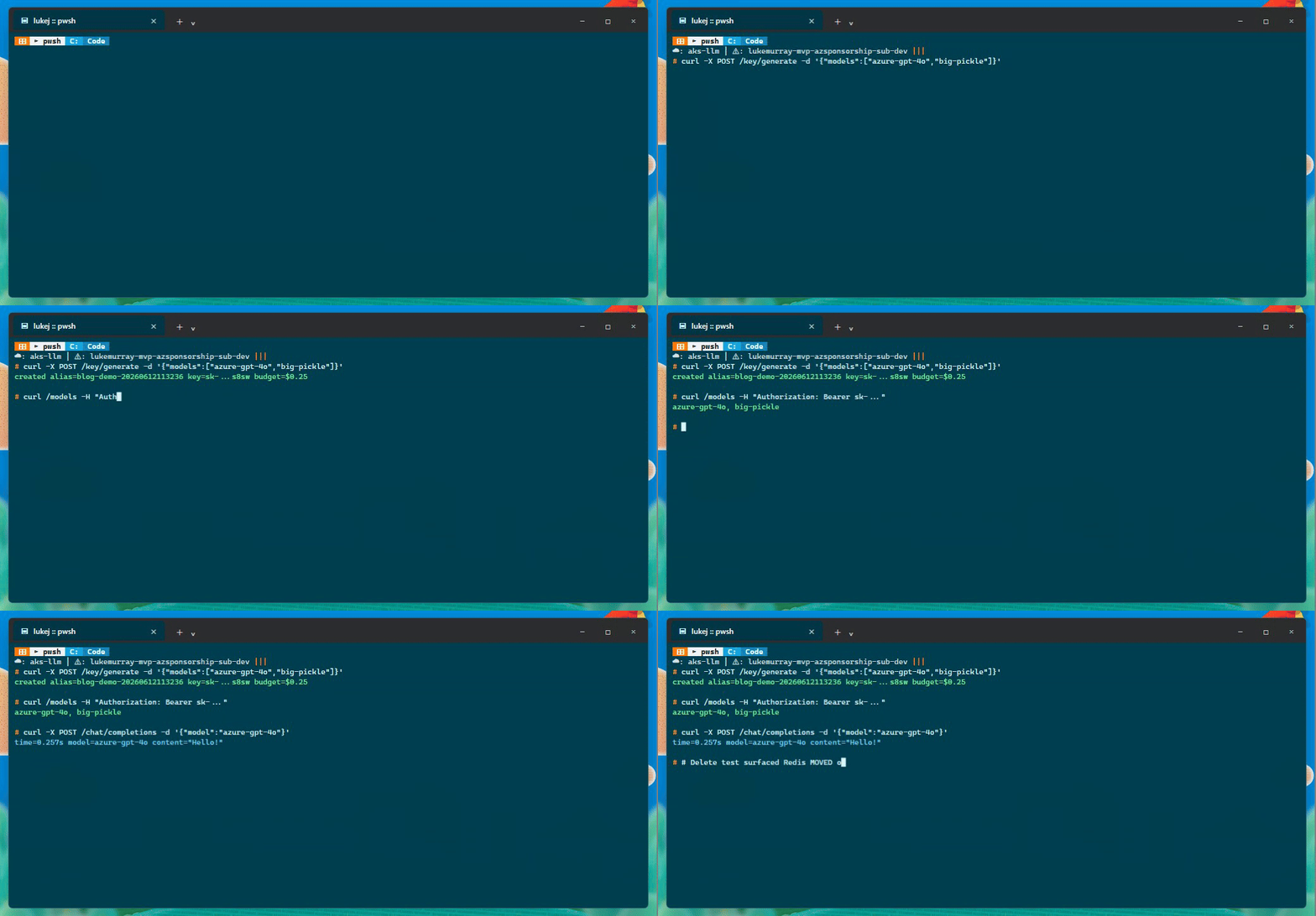
I also tested the virtual key path from the API. The flow below creates a scoped key, uses it for a chat completion, and records the follow-up issue I saw when trying to delete it.
Production settings from the LiteLLM docs
The LiteLLM production best practices page had a few things worth picking up.
The Redis config was the one that surprised me most - using host/port/password separately rather than a redis_url string is measurably faster (about 80 RPS according to their benchmarks). I had originally used the URL format and switched it after reading that.
The database settings are less surprising but worth noting. proxy_batch_write_at: 60 batches spend updates every 60 seconds rather than writing on every request, which makes a meaningful difference to PostgreSQL write load. I paired that with database_connection_pool_limit: 10 - with 3 replicas and 4 workers each that's 120 total connections, sitting comfortably inside PostgreSQL's defaults.
The other two I'd put in any production gateway: allow_requests_on_db_unavailable: true keeps the proxy serving requests even if PostgreSQL is momentarily unreachable (useful when you're in a private VNet and the database briefly hiccups during a scale event), and LITELLM_MODE: "PRODUCTION" disables the load_dotenv() call that would otherwise look for a .env file inside the container at startup.
Testing multi-replica behaviour
One of the main reasons to use AKS is that you can run multiple replicas for high availability. I wanted to verify that the Redis-backed caching works across pods.
I split the capture into three shorter GIFs so each one shows a specific test. The values in these captures are from the live AKS deployment, with API keys redacted.
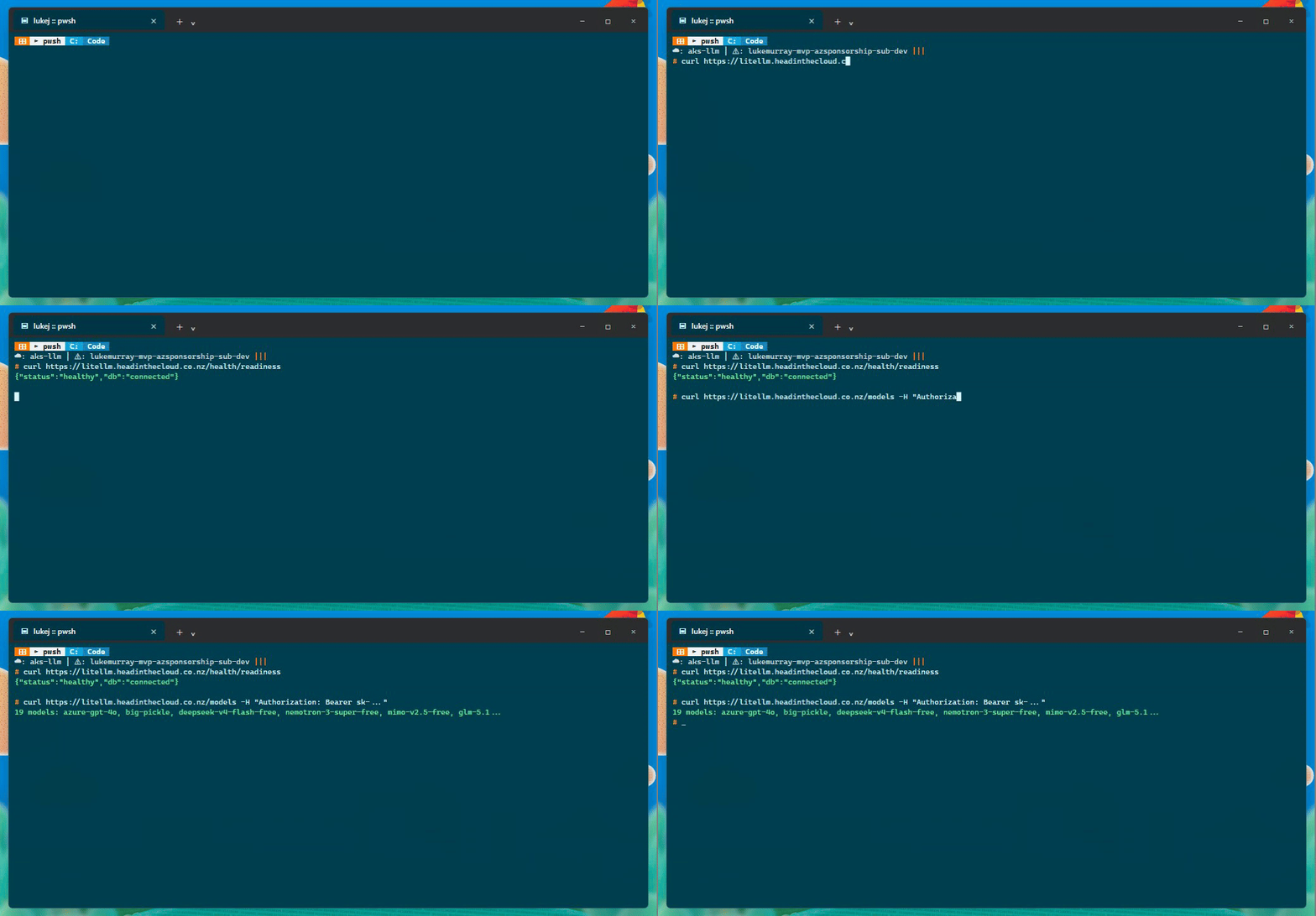
First, the proxy health and model catalogue:
Then the completion and cache checks:
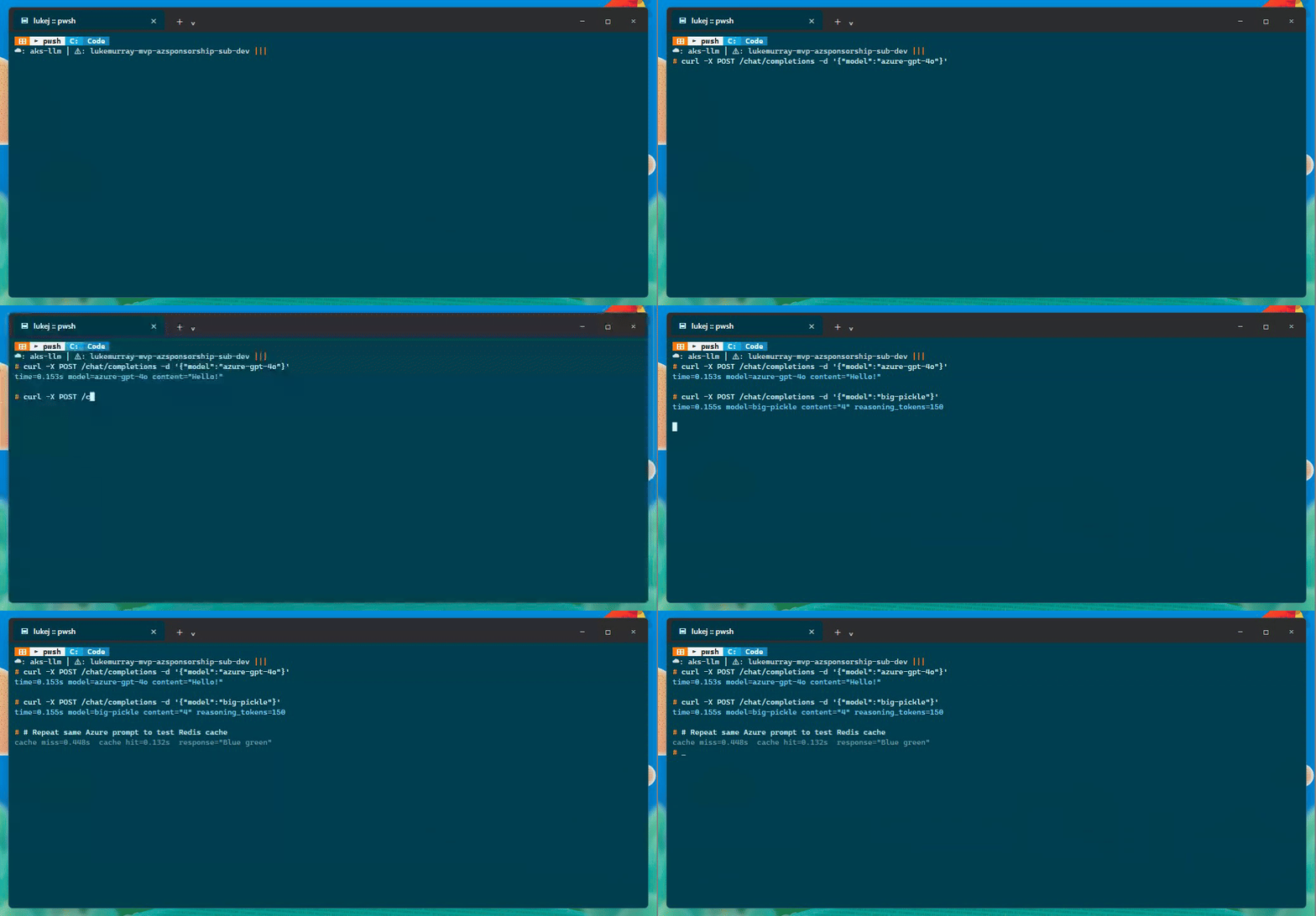
I tested a few things through the public endpoint:
| Test | Result |
|---|---|
| Readiness | {"status":"healthy","db":"connected"} |
| Model count | 19 models |
| Azure OpenAI call | azure-gpt-4o, 0.153s, response Hello! |
| OpenCode Zen call | big-pickle, 0.155s, response 4, 150 reasoning tokens |
| Redis cache | 0.448s miss, 0.132s hit |
Then I ran a cross-pod cache test against two different LiteLLM pods:
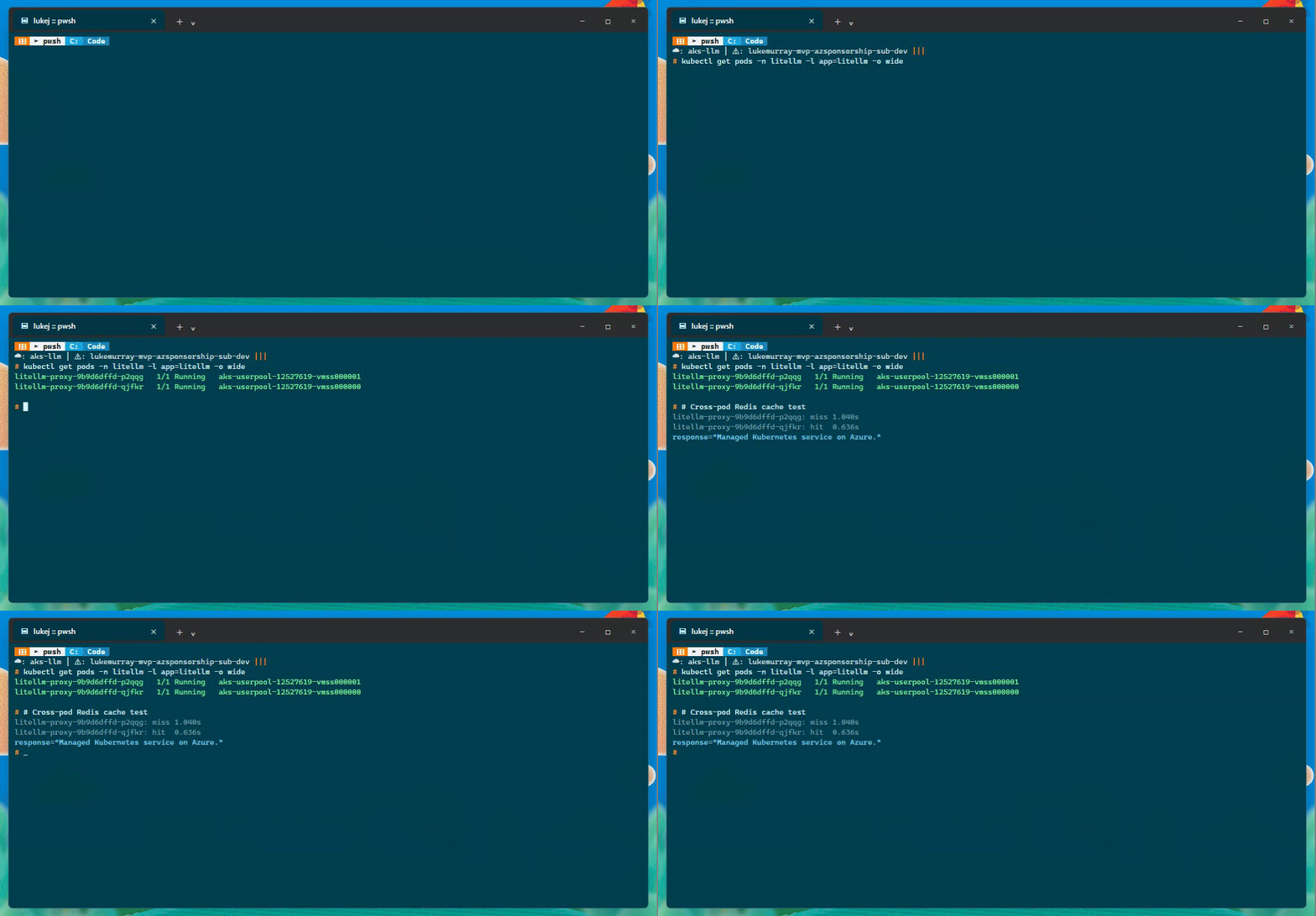
Pod A: litellm-proxy-9b9d6dffd-p2qqg on aks-userpool-12527619-vmss000001
Pod B: litellm-proxy-9b9d6dffd-qjfkr on aks-userpool-12527619-vmss000000

Pod A cache miss: 1.040s
Pod B cache hit:  0.636s
Pretty basic test case, but it proves the important bit: the response was cached by one replica and then served by another replica from Azure Managed Redis. That is the behaviour I wanted before trusting horizontal scale-out.
I also tested a shorter prompt through the public ingress:
Cache miss: 0.448s
Cache hit:  0.132s
Response:   Blue green
The NGINX ingress controller distributes requests across the pods transparently, and the Redis cache serves cached responses regardless of which pod handles the request.
AKS configuration for LiteLLM
A few settings in k8s/litellm-deployment.yaml are worth calling out.
Rolling updates and pod lifecycle
The deployment uses maxUnavailable: 0 and maxSurge: 1, so Kubernetes never drops below the desired replica count during a rollout. A new pod starts, passes its readiness probe, gets added to the service, and only then does an old pod get terminated.
The readiness probe hits /health/readiness with a 30-second initial delay. LiteLLM won't pass that probe until Prisma has finished running migrate deploy, which matters because on first deploy it runs schema migrations before it's ready for traffic. The liveness probe is separate - /health/liveliness with a 60-second initial delay and 15-second period, so three failures in a row trigger a restart.
Graceful shutdown uses terminationGracePeriodSeconds: 620 and a 5-second preStop sleep. The grace period is deliberately longer than LiteLLM's 600-second request timeout so in-flight requests can finish. The preStop sleep gives the load balancer a moment to deregister the pod before SIGTERM lands.
terminationGracePeriodSeconds: 620
lifecycle:
  preStop:
    exec:
      command: ["sh", "-c", "sleep 5"]
Autoscaling and disruption budget
The HPA targets 60% CPU and 80% memory, scaling between 2 and 10 replicas. The PodDisruptionBudget sets minAvailable: 1, so kubectl drain during node maintenance can't terminate the last running pod. Worth having, especially in a two-node user pool.
Read-only root filesystem
The container runs with readOnlyRootFilesystem: true, runAsNonRoot: true, and all capabilities dropped. LiteLLM needs a few writable directories - Prisma writes binaries to a cache directory, migrations state needs somewhere to live, and the UI needs writable paths for assets and logos. I used emptyDir volumes at /app/cache, /app/migrations, /app/var/litellm/ui, /app/var/litellm/assets, and /tmp.
The LITELLM_NON_ROOT=true environment variable adjusts the default UI paths to point into /app/var/litellm rather than trying to write into the container root.
Some things I learned
The CoreDNS split-DNS thing caught me early. AKS pods resolve DNS through CoreDNS, which by default forwards everything to the node's resolver - Azure DNS at 168.63.129.16. That works fine for private DNS zones (PostgreSQL, Redis, ACR all resolve correctly through private endpoints), but it breaks for public internet lookups. cert-manager's Let's Encrypt HTTP-01 challenge needs to resolve public domains, and with the default config it can't. The fix is a CoreDNS ConfigMap patch that sends public queries to 8.8.8.8 while keeping Azure private zones on 168.63.129.16 - the postprovision hook applies this automatically, but it's worth understanding why it's there.
Related to that: the first deploy I did, cert-manager started the Let's Encrypt flow before the DNS A record had fully propagated. The challenge timed out and left a stale cm-acme-http-solver pod sitting in the namespace. Deleting the Certificate and CertificateRequest objects forced a fresh attempt once the DNS was actually ready.
Kubernetes secrets don't hot-reload - worth remembering. When I added the OpenCode Go API key I updated the secret in the cluster, but the running pods still had the old environment because envFrom secrets are only loaded at pod startup. A force delete of the pods fixed it.
The virtual key deletion path still needs a closer look. Creating a scoped key and using it for completions worked fine, but the delete step surfaced a Redis cluster MOVED error during auth cache invalidation. The key disappeared from the list so it seems functionally gone, but I wouldn't call that clean. Left it as a follow-up rather than pretending it didn't happen.
Operational checklist
Once the proxy is deployed, here is how I validate it is working:
# AKS cluster state
az aks show -g rg-llm -n aks-llm --query provisioningState -o tsv
kubectl get nodes
kubectl get pods -n litellm -o wide
kubectl get hpa -n litellm

# LiteLLM health and model catalogue
curl https://litellm.headinthecloud.co.nz/health/readiness
curl https://litellm.headinthecloud.co.nz/models -H "Authorization: Bearer <key>"

# Test a completion
curl -X POST https://litellm.headinthecloud.co.nz/chat/completions \
  -H "Content-Type: application/json" \
  -H "Authorization: Bearer <key>" \
  -d '{"model":"azure-gpt-4o","messages":[{"role":"user","content":"hello"}]}'

# Test Redis cache by repeating the same request
curl -X POST https://litellm.headinthecloud.co.nz/chat/completions \
  -H "Content-Type: application/json" \
  -H "Authorization: Bearer <key>" \
  -d '{"model":"azure-gpt-4o","messages":[{"role":"user","content":"hello"}]}'

# Check Prometheus metrics
(Invoke-WebRequest https://litellm.headinthecloud.co.nz/metrics).Content | Select-String "litellm_"

# Check ingress TLS certificate
kubectl get certificate -n litellm -o wide
The test suite in scripts/test-litellm.ps1 runs 26 checks across health, models, keys, chat, spend, metrics, and security. It cleans up generated test keys at the end.
./scripts/test-litellm.ps1 -BaseUrl https://litellm.headinthecloud.co.nz -MasterKey <key>
Cost and cleanup
This is not a free deployment. AKS Standard tier with two D4s_v3 node pools, Azure Managed Redis Balanced_B0, and PostgreSQL Standard_B2ms runs roughly $400-$500 per month in Australia East. The Azure OpenAI gpt-4o deployment adds pay-per-token cost.
To tear down the whole environment:
azd down --purge
The predown hook deletes the litellm Kubernetes namespace before the resource group removal starts, so there are no dangling load balancer resources. If you want to keep data for later, export the PostgreSQL database first and store the LITELLM_SALT_KEY somewhere safe - you will need it to decrypt stored credentials when you restore.
Wrapping up
This should give you a starting point for running LiteLLM on AKS. The azd template handles the full deployment lifecycle, and the production configuration covers caching, rate limiting, spend tracking, and high availability out of the box.
I had a lot of fun setting this up. The mind boggles at what you could do with the MCP Gateway features on top of this - wiring up Microsoft Learn documentation tools or GitHub MCP servers through the same proxy. Something for the backlog.
References
LiteLLM:
Azure Infrastructure & Deployment:
- Azure Developer CLI
- AKS network concepts and security
- Bicep language overview
- HTTPS ingress on AKS with cert-manager
Networking & Private Connectivity:
Data Services: